
IP management software: one system for the whole IP practice.
IPBases is an IP management system (IPMS) for law firms, trademark agents and IP practices. Trademarks, patents and designs, their deadlines and renewals, the documents and emails about them, and the invoices — on one record, on your own server.
What is IP management software?
A short definition, and what separates a system from a spreadsheet.
IP management software is the system an IP practice uses to keep track of the rights it looks after — trademarks, patents and industrial designs — and of everything that happens to them: filings, office actions, publication, registration, renewals, oppositions, assignments and the costs along the way.
An IP management system (often shortened to IPMS) goes further than a docketing calendar. It connects each right to its owner, to the firm or agent that sent or handles the work, to its documents and correspondence, and to its invoices. The point is that one record answers every question: what is due, who is doing it, what the client has been told, and what has been billed.
Firms usually look for an IP management platform when the spreadsheet, the shared drive, the accounting tool and the inbox stop agreeing with each other — typically when a renewal is nearly missed, or when a client asks for a portfolio report and it takes a day to assemble.
What an IP management system covers in IPBases
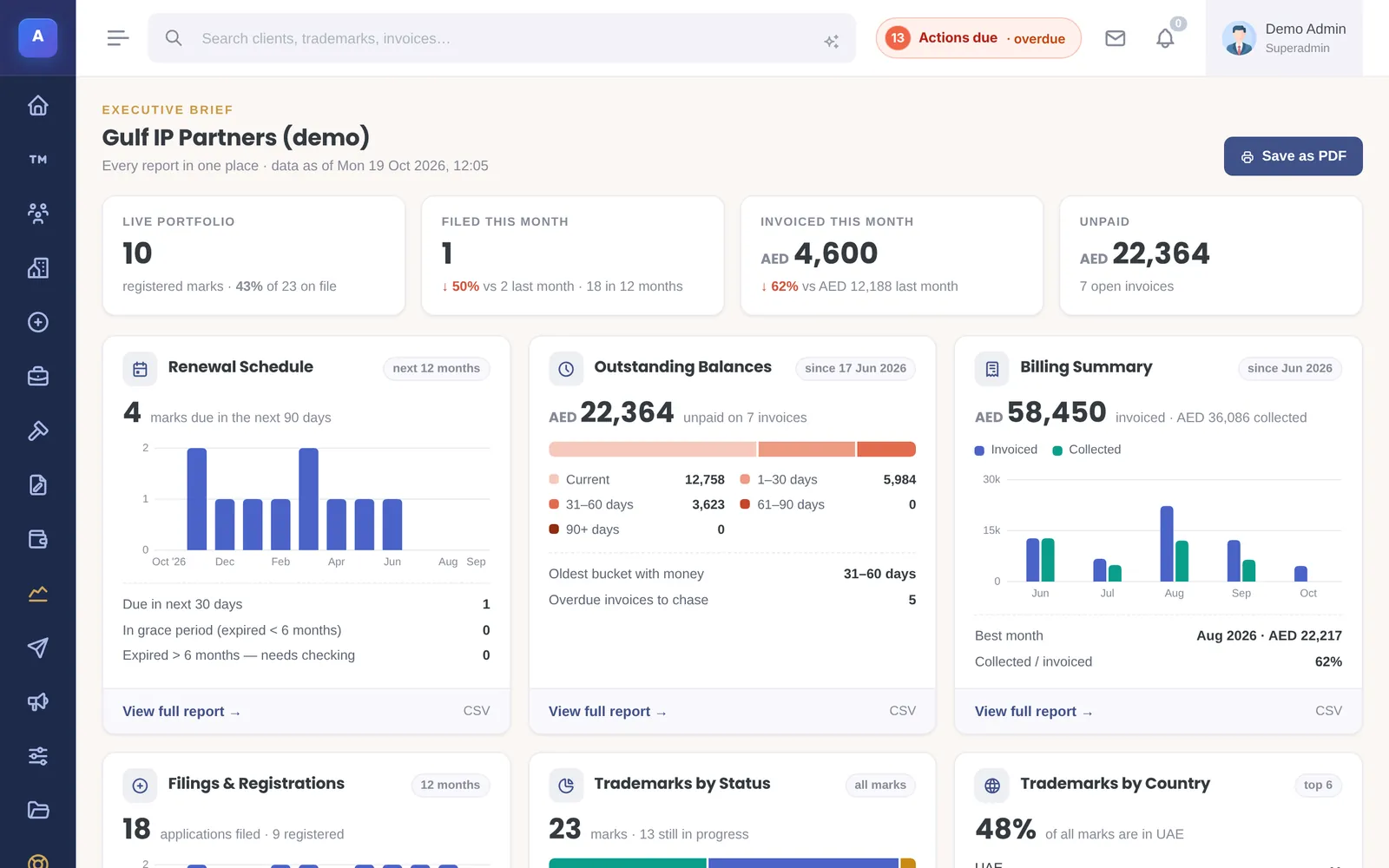
Each part reads from the same records, so nothing is typed twice.
Portfolio
Trademarks with English and Arabic names, Nice classes and route; patents (national, regional, PCT); industrial designs with Locarno classes.
Docketing
Office deadlines and your internal dates side by side, a responsible person on every action, and a next-steps list for each user.
Renewals
Due in 30 days, 90 days and 12 months, the grace period, lapsed marks, and scheduled reminder emails grouped per client.
Documents & mail
Files by category on the record they belong to, a mail inbox matched to clients and marks, and storage on your server, S3 or R2.
Client correspondence
Filing, acceptance, publication and registration notices in English or Arabic, by email, PDF letter or WhatsApp.
Billing
Invoices to the client or the associate in AED, SAR, KWD, QAR, USD, EUR and more, payments, aging and fee proposals.
Portals
A client portal and an associate portal on your domain, each showing only that party’s records.
Watch & cases
Watch hits with opposition deadlines, and cases with stages, files and the other side.
Reports
The Executive Brief plus reports by status, country, client, renewals and outstanding balances.
IP management system vs. separate tools
What changes day to day when the practice runs on one record.
| Separate tools (spreadsheet + drive + accounting + inbox) | IPBases | |
|---|---|---|
| Deadlines | A calendar or sheet someone must update by hand | Office and internal dates on each action, with a person and a next-steps list |
| Renewals | Found by filtering a sheet | A report a year ahead, grace period tab, scheduled grouped reminders |
| Documents | Folders named by convention | Filed by category on the trademark, patent or client |
| Client notices | Written from scratch each time | Generated from the record in English or Arabic |
| Billing | Retyped into accounting software | Invoiced from the work on the mark, to the client or the associate |
| Who changed what | Unknown | Audit log with before and after values |
| Where the data lives | Spread across services | One database on your own server |
How it fits together
The record connects everything
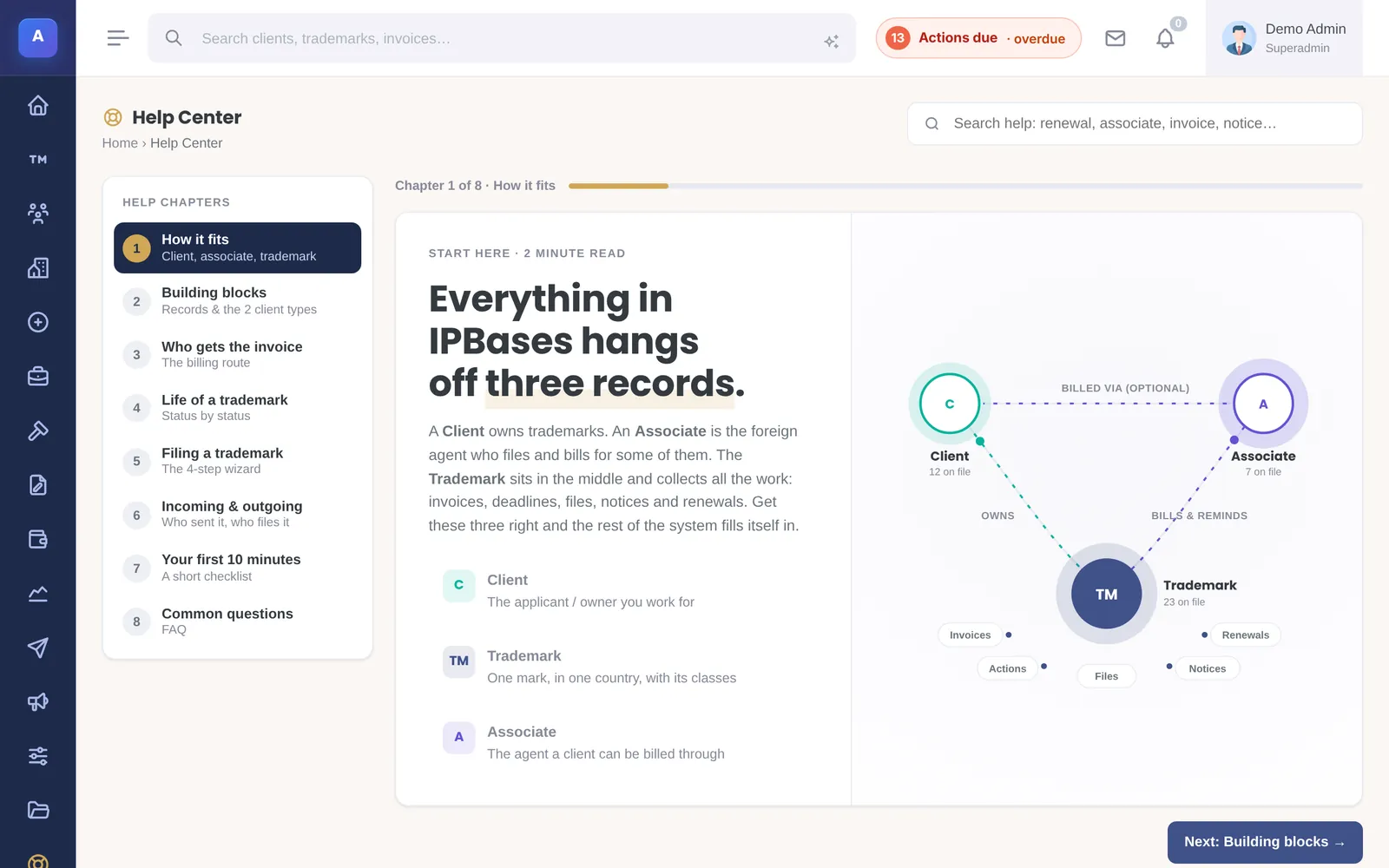
A client owns marks; an associate may send the work or be billed for it; each mark has its files, invoices, deadlines and emails. The Help Center inside IPBases teaches new staff exactly this.
- Clients, associates and trademarks linked
- Invoices routed to the right party
- Everything visible from the record
Deadlines nobody has to remember
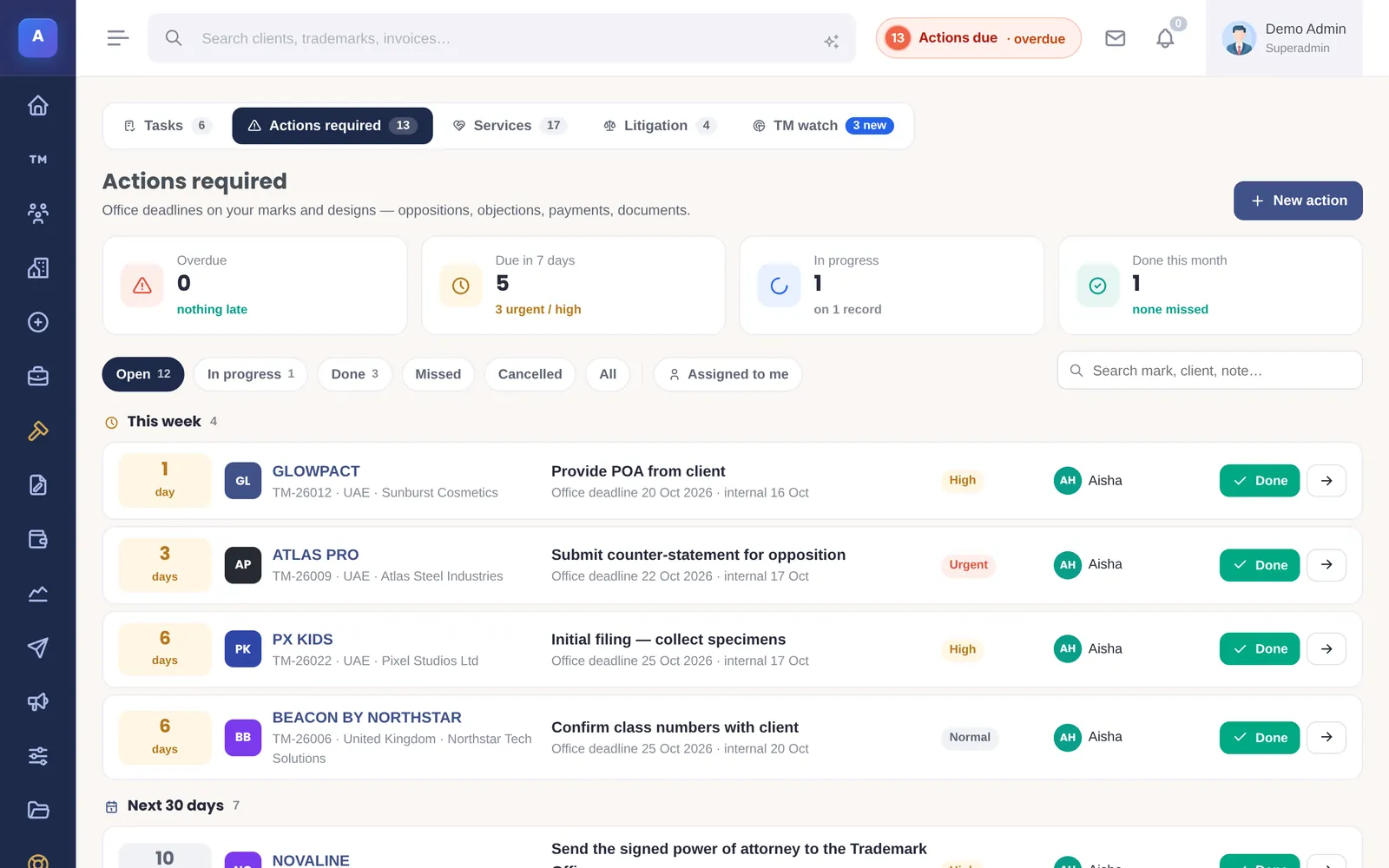
Every action carries the office deadline and the date your firm plans to act, with the person responsible. Each user starts the day with their own list of next steps, worked out from their records.
- Overdue, due this week and due in 30 days
- Snooze with a reason, or mark done
- Renewals planned a year ahead
Control over who sees what
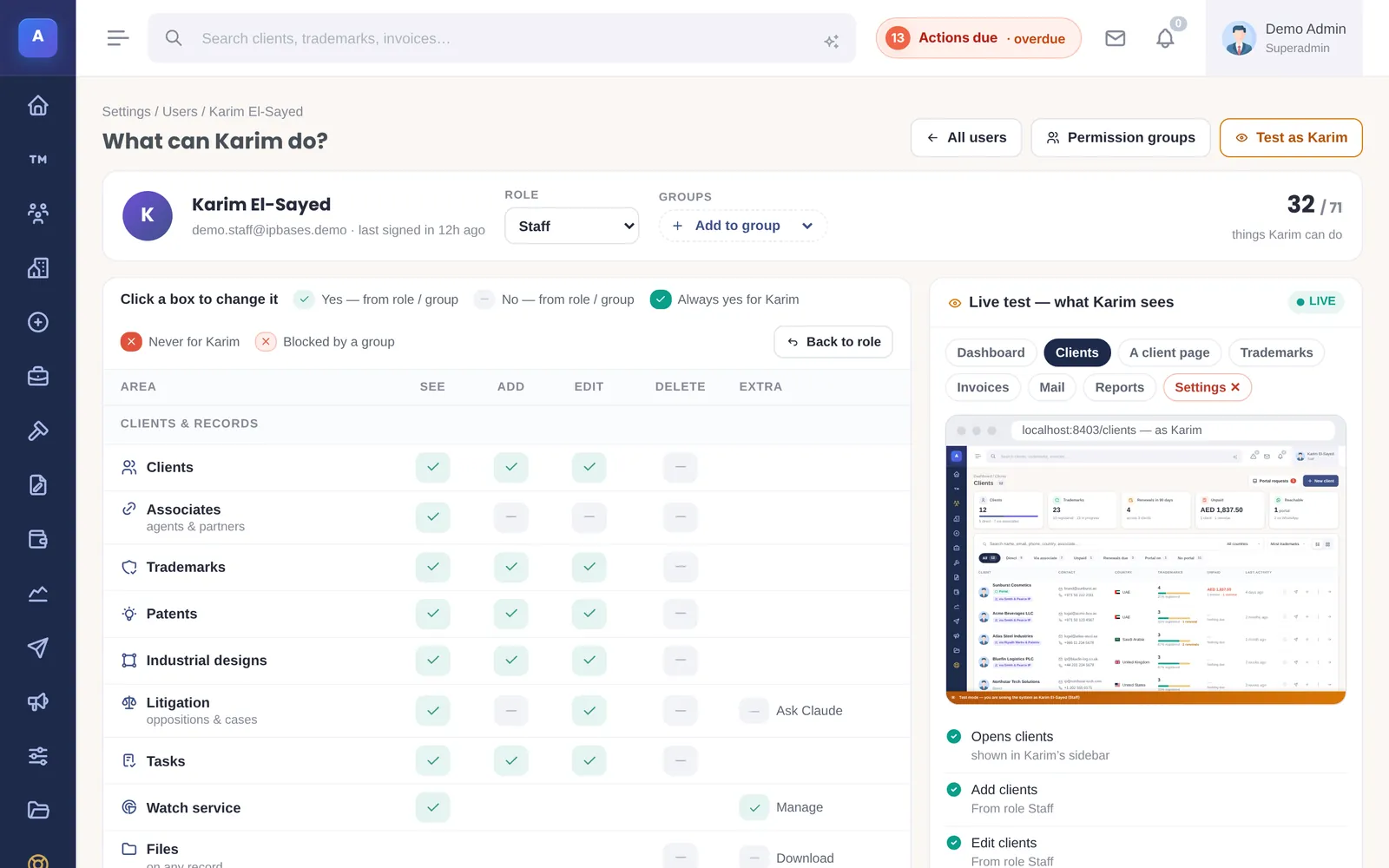
Roles, permission groups with Allow and Never rules, a live preview of a colleague’s access, and an audit log of every change.
- Finance access only for those who need it
- Test access before someone logs in
- Every change recorded with before and after
Choosing an IP management solution: seven questions
The questions that separate IP management platforms in practice. Our guide to the best IP management software goes through each in depth.
- Does it cover every right you handle? Trademarks only, or patents and designs too — under one licence?
- Are deadlines tied to people? An office date without an owner is how deadlines get missed.
- Can it bill the way you bill? Clients and foreign associates, several currencies, official and professional fees.
- Who holds the data? Cloud subscription or your own server — and can you take a full export?
- How do your records get in? Ask exactly how your spreadsheets or old IPMS will be moved, and check them before you switch.
- What does it cost over five years? Per-seat subscriptions compound; a one-time licence does not.
- Does it speak your clients’ language? For Middle East work, Arabic notices and right-to-left letters matter.
Self-hosted IP management, priced once
IPBases is installed on your own server — a standard cPanel host or a VPS with PHP 8 and MySQL or MariaDB — so client data stays where you host it. Stored passwords, API keys, client ID numbers and database backups are encrypted with AES-256-GCM using a key unique to your installation.
A one-time licence: Professional is $4,999 for one firm and up to 25 users, with one year of updates and support. Installation, setup, data migration from your spreadsheets or old system, and customisation are included. There are no subscriptions and no per-seat fees.
Compare the five-year cost against subscription tools on the price comparison, or see what is included on the pricing page.
Questions firms ask
What is an IP management system (IPMS)?
Is IP management software the same as docketing software?
Does IPBases handle patents as well as trademarks?
Can we move from Excel or another IP management system?
Is it cloud or self-hosted?
How much does it cost?
Is there a demo?
Related
See IPBases with your own eyes
Open the live demo and click around a real IPBases with realistic data. Questions about your firm, your marks or your Excel sheet? Ask us on WhatsApp or by email.
Message us on WhatsApp or email [email protected].